Track Your Company Filings Online in Real Time: Every ROC Filing, Step by Step, on the Bizadvisor Platform
You asked us to file your annual return three weeks ago. Where is it now? Has it gone to the Registrar? Is it waiting on a signature — yours or someone else's? Until today, the honest answer was: email us and ask.
That changes now. The Bizadvisor platform has a new page called Requests, and it shows you the live status of every filing and service our team is working on for your company — as a step-by-step tracker, in plain language, updated as the work actually happens.
If you have ever tracked a courier parcel, you already know how to use it.
What the Requests page shows
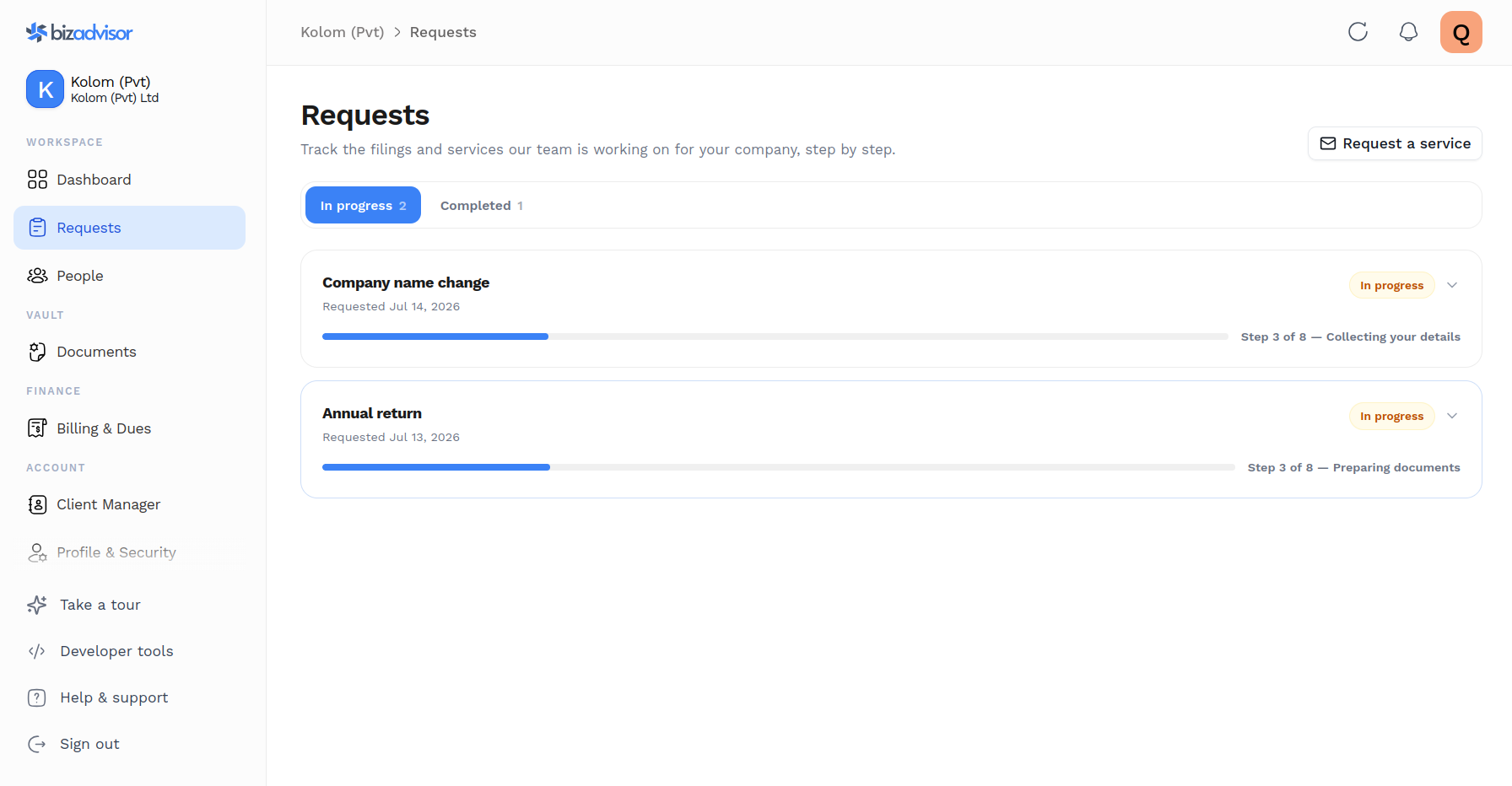
Open Requests in the platform sidebar and you'll see a card for each piece of work we're handling for your company. At a glance, every card tells you:
- What it is — "Annual return", "Change of directors", "Company name change"
- Where it stands — a status pill and a progress bar
- What's happening right now — "Step 3 of 8 — Awaiting your signature"
- When it started, and for finished work, when it was completed
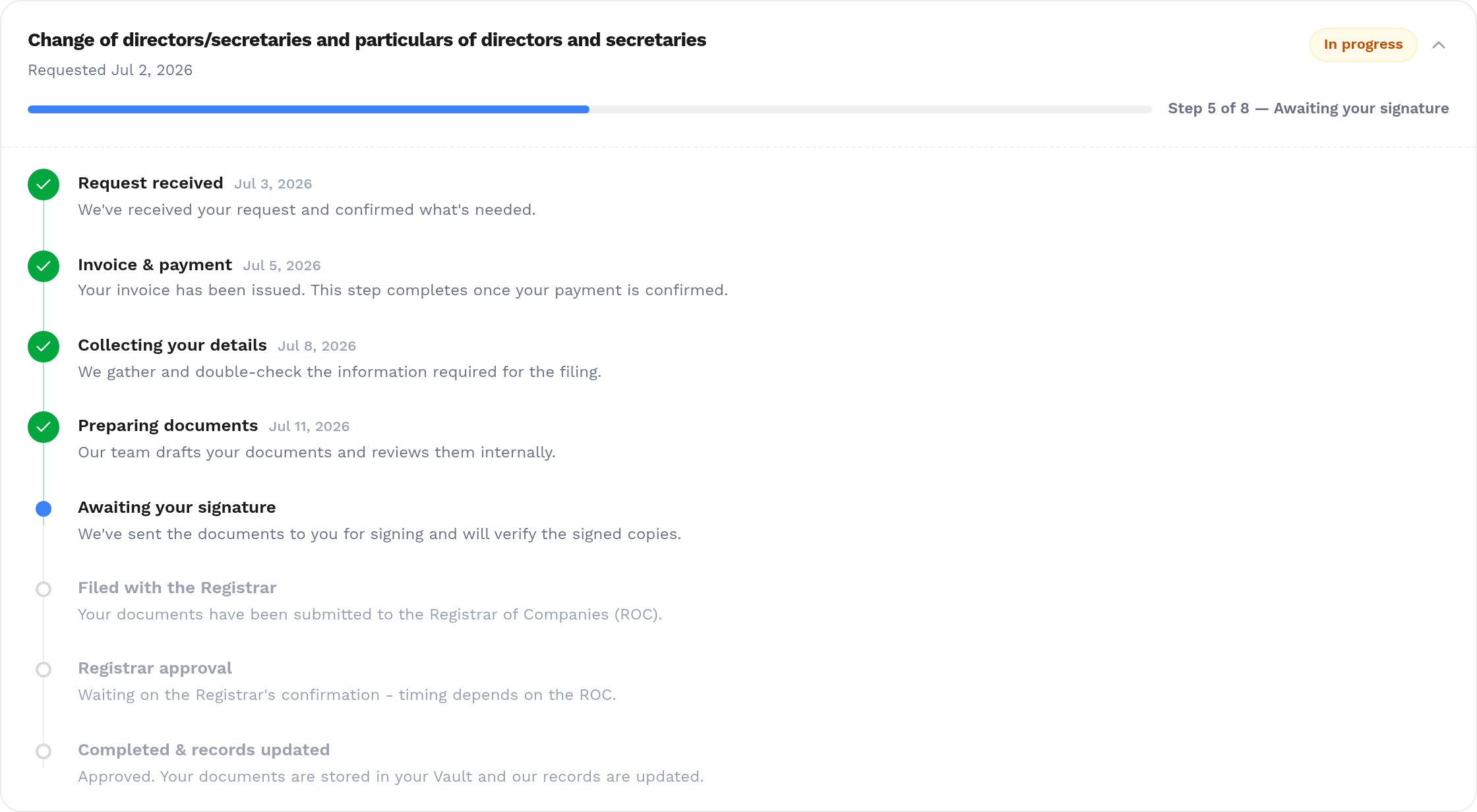
Tap any card and it expands into a full timeline. Completed steps are ticked off with the date they were done. The current step pulses. The remaining steps wait below, so you can see exactly what's left.
And because "Submitted to ROC" shouldn't require a law degree to interpret, every step carries a one-line explanation underneath it. "Filed with the Registrar" tells you, right there, that your documents have been submitted to the Registrar of Companies and we're waiting on their processing.
The journey of a filing, step by step
Most company filings in Sri Lanka follow the same broad path, and that's exactly what the tracker shows:
- Request received — we've confirmed what's needed and opened the job.
- Invoice & payment — your invoice has been issued; the step completes when payment is confirmed.
- Collecting your details — we gather and double-check the information the filing requires.
- Preparing documents — our team drafts your documents and reviews them internally.
- Awaiting your signature — the documents are with you for signing; we verify the signed copies when they come back.
- Filed with the Registrar — your documents have been submitted to the Registrar of Companies (ROC).
- Registrar approval — we wait on the ROC's confirmation. This is the step whose timing is out of everyone's hands but the Registrar's — and now you can see that clearly instead of wondering whether we've gone quiet.
- Completed & records updated — approved. Your documents land in your platform Vault, and our records are updated.
Some services have their own stages. A tax registration shows "Filed with Inland Revenue" and "TIN setup". A share transfer adds "Issuing share certificates". Filings that involve beneficial ownership forms show that stage too. Whatever the service, the steps you see are the steps that actually apply to it.
Which services you can track
If our team is doing it for your company, it shows up. That includes:
- Annual return filings
- Director and secretary changes
- Registered address changes
- Company name changes
- Share issues and share transfers
- Changes to your articles of association
- Beneficial ownership (BO) forms
- Tax registrations
- Board minutes and resolutions
- Company strike-offs
Finished work doesn't disappear, either. The Completed tab keeps the full history of everything we've done for your company, with each filing's completed timeline intact — useful the next time a bank or an auditor asks when something was filed.
It's on your dashboard too
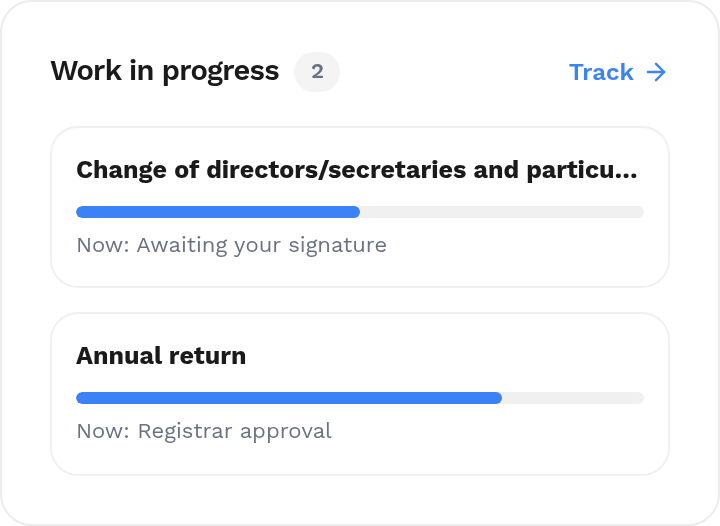
You don't even need to open the Requests page to know something is moving. When we're actively working on something for your company, a Work in progress card appears right on your platform dashboard, showing each active request with its progress bar and current step. One click takes you to the full timeline. When there's nothing in flight, the card quietly disappears.
Why we built this
Two reasons.
The first is simple transparency. This tracker isn't a status report someone types up for you — it reads from the same internal system our team uses to do the work. When our team completes a step, your page reflects it. There is nothing to forget to update, and no version of events written specially for the client.
The second is your time. "Any update on the annual return?" is one of the most common emails we receive, and every one of them deserves a faster answer than a reply written hours later. Now the answer is on your screen in five seconds, at midnight if that's when you happen to wonder.
You'll notice the tracker shows you meaningful stages rather than our full internal checklist. Behind "Preparing documents" sit several rounds of internal drafting and verification; behind "Invoice & payment" sits our finance process. You see the stages that matter to you, worded for humans — the internal machinery stays out of your way.
How to start tracking
If you're a Bizadvisor client, there is nothing to set up:
- Sign in at platform.bizadvisor.lk — enter your email and we send you a magic link. No password to remember.
- Click Requests in the sidebar.
- That's it. Anything we're working on for your company is already there.
Anyone connected to your company on the platform — directors, shareholders with access, your finance person — sees the same tracker, so "can you check with the secretary?" becomes a thing of the past inside your own team too.
Need something filed? The Request a service button on the page opens a pre-filled email to our team with your company details already in it. And if you're not yet a client, this tracker is one more reason to make Bizadvisor your company secretary — company secretarial service in Sri Lanka shouldn't be a black box, and now it isn't.
This is also another step in making the platform your company's single home: your records and people, your documents, your dues and payments, even your AI assistant reading your records — and now, the live progress of everything we're doing for you.
Spot something confusing, or want a step explained better? Tell us at support@bizadvisor.lk. The wording on every step is ours to improve, and we will.
Related Articles
Weave: All-in-One HR Platform for Sri Lankan Teams
Weave is an all-in-one HR platform built for Sri Lankan businesses. It runs payroll with EPF, ETF and PAYE, records attendance from fingerprint terminals or mobile check-in, and manages leave, rosters and employee records in one system.
Bizadvisor Launches Advisor AI: 24/7 Trilingual Business Advice Directly on WhatsApp
Advisor AI is the Bizadvisor assistant on WhatsApp. Message +94 77 609 1167 to check whether a company name is free at the ROC, get package prices, and ask about tax, annual returns and BO forms in English, Sinhala or Tamil.
Quarterly Income Tax Instalments in Sri Lanka: IRD's Revised Method for 2026/2027
IRD Circular SEC/2026/E/06 sets how quarterly income tax instalments are calculated from the Year of Assessment 2026/2027. First instalment due on or before 15 August 2026. The formula, the three methods, and what to file.